
What it is
Two tabs in Analytics answer "where do our leads come from, and what happens to them?".
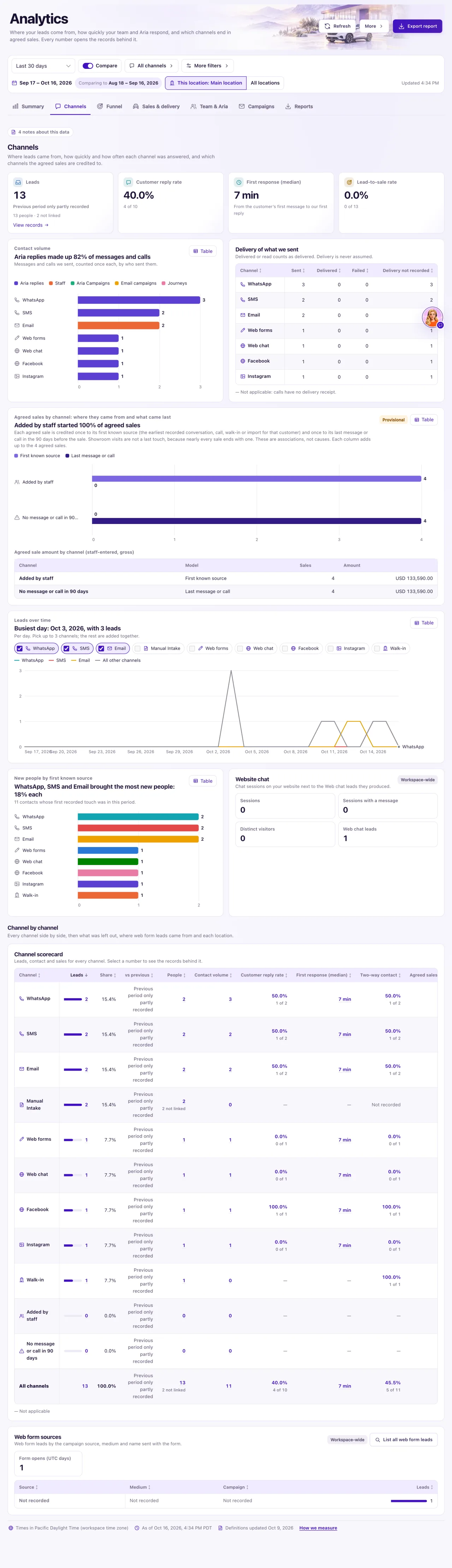
- Channels: leads by channel, how quickly and how often each channel was answered, whether what you sent was delivered, and which channels the agreed sales are credited to.
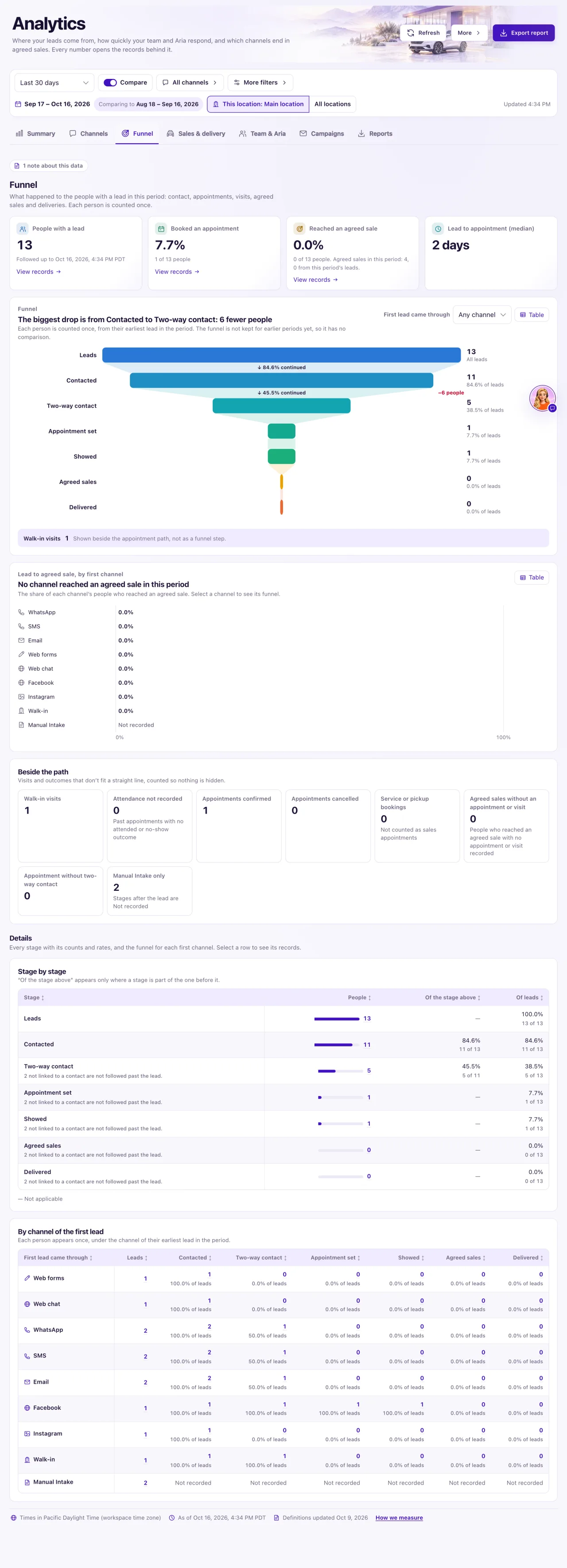
- Sales & visits (the funnel, called Funnel before 24 Oct 2026): what happened to the people with a lead in the period. Each person is counted once, from their earliest lead.
How to use it
- Open Analytics and select the Funnel tab. Pick the Period and, if needed, a channel or Team member filter.
- Read the stages: Leads → Contacted → Two-way contact → Appointment set → Showed → Agreed sales → Delivered.
- Use First lead came through to see one channel's funnel.
- Read Lead to agreed sale, by first channel to compare channels, and Beside the path for walk-ins, unrecorded attendance and other items outside the main path.
- Open Details for the Stage by stage table and By channel of the first lead.
- Select the Channels tab. The top tiles are Leads, Customer reply rate, First response (median) and Lead-to-sale rate.
- Scroll to Contact volume, Delivery of what we sent, Agreed sales by channel: where they came from and what came last and Leads over time.
- Under Channel by channel, read the Channel scorecard, Not counted as leads and Web form sources. By location shows when All locations is chosen.
- Select View records, a bar or a table cell to open the records behind a number.
What the data means
| Stage | Counts a person when |
|---|---|
| Contacted | You sent a message or call after their first lead message, or the lead was a call or walk-in |
| Two-way contact | A real exchange: you wrote and they answered, a connected call, or a walk-in |
| Appointment set | A showroom or test-drive appointment. Service and pickup bookings are listed beside the path |
| Showed | A visit recorded as attended |
| Agreed sales | An agreed sale dated on or after the lead |
| Delivered | A verified delivery |
"Of leads" compares each stage with the start. "Of the stage above" shows only where a stage is truly part of the one before. The Funnel follows people for up to 366 days and the first 5,000 people in a period, and it has no comparison with an earlier period.
On Channels, Customer reply rate is conversations you wrote to where the customer wrote back within 14 days. First response (median) runs from the customer's first message to your first reply. Delivery of what we sent shows Sent, Delivered, Failed and Delivery not recorded; delivered or read counts as delivered, and delivery is never assumed. Agreed sales are credited once to the first known source and once to the last message or call in the 90 days before the sale. These are associations, not causes.
Possible issues and fixes
The Funnel says it follows only the first 5,000 people
Symptom: A note says the period has more than 5,000 people with a lead.
Why: The Funnel follows at most 5,000 people per period.
Fix: Choose a shorter period to follow everyone.
How to check: The note is gone and People with a lead matches the period.
Leads is lower than the messages we received
Symptom: Leads is smaller than the number of conversations you saw.
Why: Some conversations are Not counted as leads: Excluded conversations, Social messages (a greeting on its own), Started by a campaign and Started by the dealership.
Fix: On Channels, open Not counted as leads and select a number to see them. If a real customer is there, an Owner opens it in Intake and selects Move to Inbox.
How to check: After a refresh, the customer counts under Leads.
Delivery shows Failed or "Delivery not recorded"
Symptom: Some messages under Delivery of what we sent are Failed or Delivery not recorded.
Why: Failed means the channel refused or couldn't deliver it, for example the customer replied STOP or an email bounced. Delivery not recorded means no result has come back yet.
Fix: Select the channel's row, open a conversation and read the reason beside the message. Check before sending again, to avoid a duplicate.
How to check: The Failed count stops growing for new sends.
Showed and Attended visits are 0, but customers came in
Symptom: Showed is 0 even though customers visited.
Why: Attendance is never assumed. A visit counts only when someone records its outcome.
Fix: Open Visits, select the appointment and choose Record outcome.
How to check: Attendance not recorded under Beside the path falls and Showed rises.
