
What it is
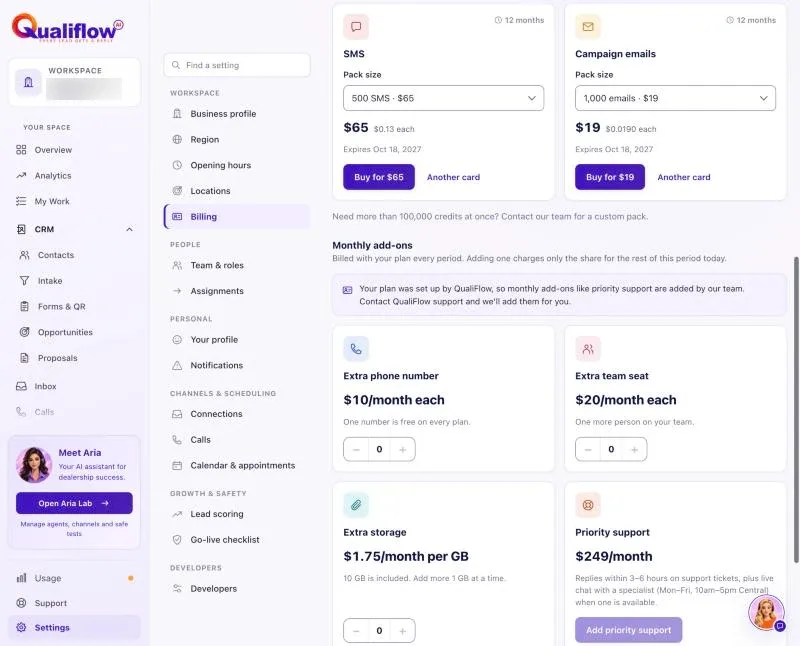
Your plan includes one phone number for calls and texts. If you need more, add Extra phone number to your subscription for $10 a month each.
The calls and texts on your numbers use your plan's call minutes and SMS.
How to use it
- Set up your included number in Settings → Connections → SMS & calls.
- For another number, the Owner first adds Extra phone number in Settings → Billing.
- Then set up the new number in Settings → Connections → SMS & calls.
- To stop paying for an extra number you no longer need, remove it from your subscription in Settings → Billing.
What the data means
Phone numbers in Settings → Billing shows how many numbers you have against your plan's limit: 1 plus your extra numbers.
Texting registration for your business is a one-time $25 fee.
Possible issues and fixes
I can't add another number
Symptom: Setting up a number says you have reached your plan's limit of phone numbers.
Why: Your included number, and any extra numbers, are in use.
Fix: Add Extra phone number in Settings → Billing, then try again.
How to check: The number setup continues.
