
What it is
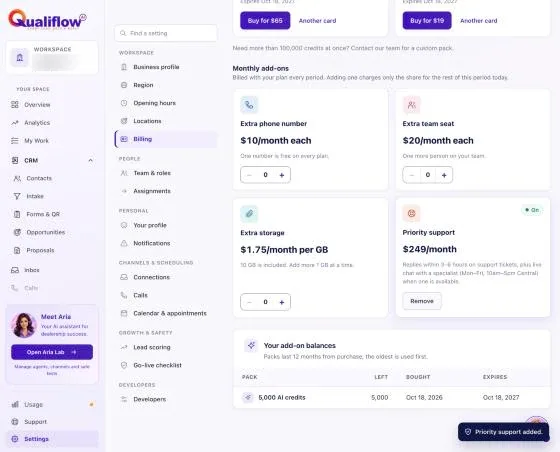
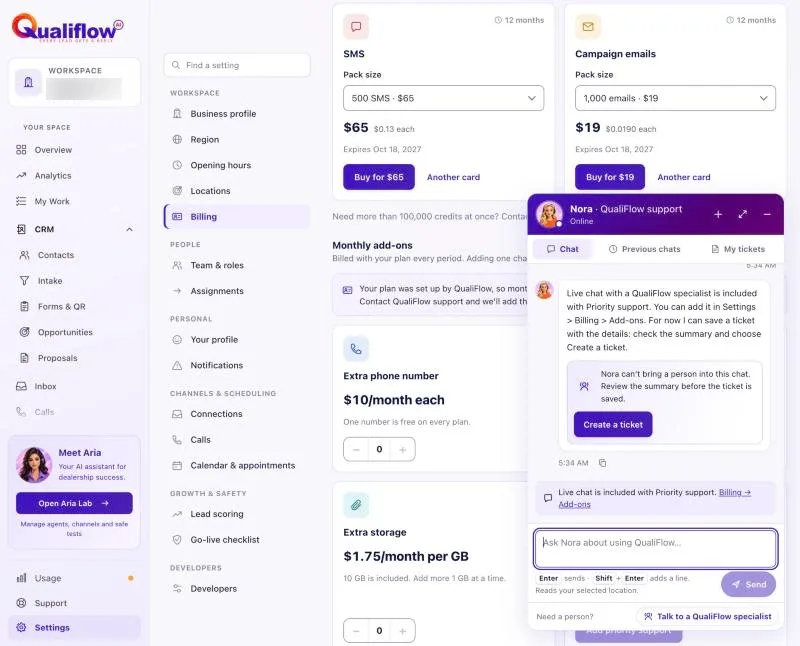
Priority support gets you faster answers from our team: replies within 3–6 hours on support tickets, plus live chat with a QualiFlow specialist (Monday to Friday, 10am–5pm Central) right in the Nora window. Live chat needs a specialist to be available; when no one is, Nora saves a ticket instead. It is an add-on you can take on any plan, billed with your subscription.
Standard support (tickets) and Nora, the help assistant, are included on every plan.
How to use it
- Open Settings → Billing and go to the add-ons. Only the Owner can add it.
- Add Priority support. It is billed with your subscription period.
- Contact us as usual from Support, or ask Nora to connect you with a specialist during support hours.
- To stop it, remove it in Settings → Billing. The credit comes on your next invoice.
The Priority support card shows the live chat hours the QualiFlow team has set right now. If QualiFlow set up your plan (no card subscription), the card says it is added by our team: contact QualiFlow support and we'll add it. This is also what you see after priority support that our team added is turned off.
What the data means
| Billing period | Price |
|---|---|
| Monthly | $249 a month |
| Quarterly | $657 a quarter ($219 a month) |
| Annual | $2,388 a year ($199 a month) |
Possible issues and fixes
I can't find priority support for my billing period
Symptom: Only one priority support price is offered.
Why: It is billed with your subscription, so it follows your plan's billing period.
Fix: To pay for it another way, change your plan's billing period first.
How to check: The add-on shows on your next invoice.
