
What it is
Booking works with no setup. QualiFlow keeps a default booking setup by itself: each location and every active team member, on QualiFlow's calendar, open during your opening hours, closed on US public holidays and the days you mark closed. Settings → Booking fine-tunes it. Aria follows the same days when she talks to customers: on a holiday the showroom is closed for, or a day you mark closed, she says plainly that you're closed today, still answers, and gives your next opening time. She never offers or books a closed day or a time outside your hours. On a public holiday she opens her first reply in a conversation with a short greeting ("Merry Christmas!" on December 25, "Happy holidays!" for the rest of the season, "Happy Thanksgiving!", "Happy New Year!", "Happy 4th of July!"; none on Memorial Day or Veterans Day), once.
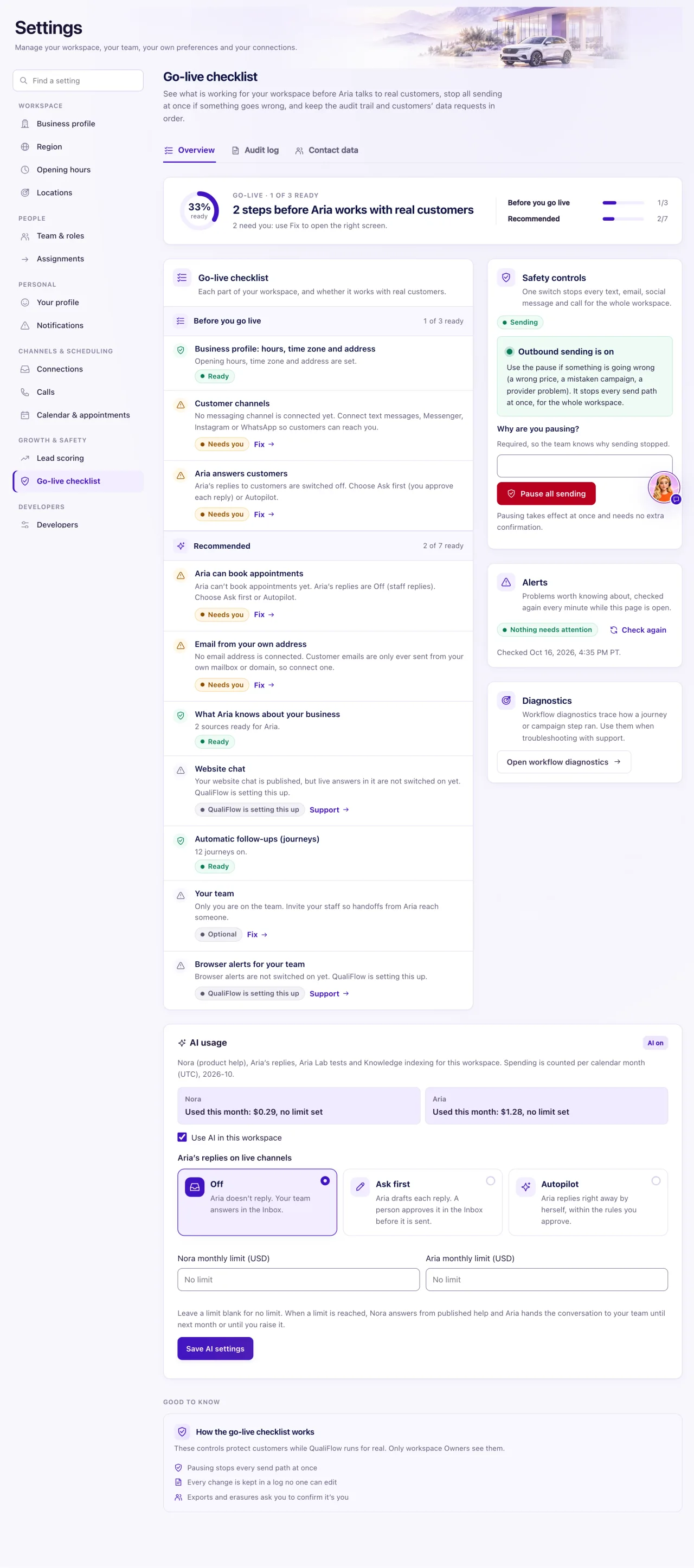
When Aria can't book, she tells the customer the team will confirm the time and passes the request to your team. The most common causes are no opening hours and live rules that don't allow Book appointments. The Go-live checklist row Aria can book appointments checks everything at once.
If everything here is set up and Aria still passes bookings to your team, read Why can't Aria book appointments? in Troubleshooting.
How to use it
- Check your opening hours in Settings → Opening hours (and each location's hours in Settings → Locations). With no opening hours, no time can be booked.
- Open Settings → Booking to set Visits at the same time (3 by default), Close on public holidays (the US federal holidays; any day can be switched back to open), Other days you close and Calendar details (Full or Private). The Owner saves; Managers can view it.
- Open Settings → Go-live checklist and find Aria can book appointments. If it offers Turn on Book appointments, select it: it allows booking in her approved rules and switches on her booking tools.
- Resources with their own hours (the old Manage resources) are under Settings → Booking → Advanced. A workspace that built its own resources can switch with Use the simple setup, and back with Go back to my own setup.
- Open the customer's conversation. Under Human attention, the hand-off ends with "Aria could not do it:" and the reason when a rule, tool, contact link or the customer's words stopped her.
- Look after the waiting customer: select Take over, book it yourself with Book appointment, tell the customer, and Hand back to Aria when you're done.
- Test from a personal account on a real channel: "Book me a showroom visit tomorrow at 3pm", then confirm the exact time Aria offers.
What the data means
Aria books only an exact time the customer agreed to: a booking word with a day and time, or a clear "yes" to the one time she just offered (within 7 days, with no team reply in between). "Maybe" never counts. She reads free times a week at a time, offering up to 8, and can look further ahead when the customer asks, so she books across at least the whole next week.
On Autopilot the booking is made at once. On Ask first it waits for an approver, and Aria tells the customer it is awaiting staff approval and not confirmed yet.
Aria won't book for someone who isn't linked to a Contact (a website chat visitor is first asked for a name and a phone number or email), or in a conversation your team Took over or Paused. Awaiting staff doesn't stop her. On phone calls she books with the same rules.
Possible issues and fixes
No time can be booked
Symptom: Book appointment → Find available times lists nothing, and the checklist row says it needs you.
Why: No opening hours are set, every day is marked closed in Settings → Booking, or a workspace using its own resources has none with hours.
Fix: Set your hours in Settings → Opening hours. Check Other days you close in Settings → Booking. With your own resources, open Settings → Booking → Advanced, or switch back with Use the simple setup.
How to check: Book appointment → Find available times lists free times.
The hand-off says Aria's live rules don't let her do this
Symptom: "Aria could not do it: Aria's live rules at this location do not let her do this".
Why: The location's approved rules don't allow Book appointments, the newest revision is still a draft, the approving Owner is no longer active, or Aria is Off (staff replies).
Fix: Select Turn on Book appointments on the Go-live checklist, or in Aria setup approve rules that include Book appointments. Rules are approved per location.
How to check: The checklist row shows Ready.
The hand-off says the customer is not linked to a contact
Symptom: "…this person is not linked to a contact yet, so confirm who they are and link them in Intake".
Why: Aria won't book for someone QualiFlow can't identify.
Fix: Open Intake, create or link the Contact, then ask the customer to confirm the time again.
How to check: The conversation shows Linked to a Contact and Aria books.
The hand-off says the customer's words didn't clearly confirm it
Symptom: "…the customer's words did not clearly confirm it".
Why: "Tomorrow at 3pm" alone, a hedge, or a "yes" after a team reply doesn't count.
Fix: Ask the customer to reply with the exact time and "please book it", or book it yourself.
How to check: The booking appears in Visits, or in Action review on Ask first.
Aria books in Aria Lab, but real customers can't book
Symptom: A Lab test books fine; real customers are passed to the team.
Why: Lab tests use your resources read-only (or simulated ones when there are none), and don't check live rules, the contact link or the conversation's state.
Fix: Set up resources and approve the live rules, then test on a real channel.
How to check: A real test booking appears in Visits → Appointments.
