
What it is
Customers only ever get email from your dealership's own address. QualiFlow sends customer email through one of three routes:
- a connected Gmail or Outlook mail mailbox;
- your own mailbox connected as Other mailbox, for Inbox replies only;
- a Ready sender on your verified Email domain.
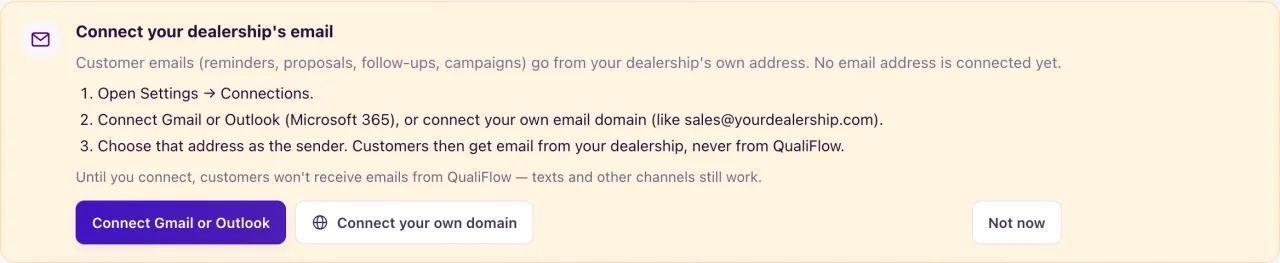
When none is connected, customer email isn't sent, and the card Connect your dealership's email appears where email would go out: the Overview, Inbox, Campaigns, Journeys, proposals, appointment reminders and review requests. QualiFlow's own address is used only for staff email, such as sign-in codes, invitations and reports.
How to use it
- On the Connect your dealership's email card, select Connect Gmail or Outlook or Connect your own domain.
- Connect Gmail or Outlook mail, or verify your email domain and add a sender.
- In a campaign, open the From picker: your domain's senders are under Your domain and your mailboxes under Connected mailboxes.
- Choose a Ready sender. A campaign can't be approved or started without one.
- On the Overview, Not now hides the card for you in this browser only.
What the data means
The card says: "Until you connect, customers won't receive emails from QualiFlow — texts and other channels still work."
A sender's Purpose decides what it sends. Marketing or Marketing and service senders send email campaigns, which always carry a one-click unsubscribe link. Service or Marketing and service senders send reminders, confirmations, proposals, journey follow-ups and review requests, which never carry an unsubscribe link.
Possible issues and fixes
A campaign says "No ready sender yet"
Symptom: "No ready sender yet. Add a sending domain or connect a mailbox — the campaign can't be approved or started without one."
Why: No mailbox is connected and no domain sender is Ready with a Marketing or Marketing and service purpose.
Fix: Connect Gmail or Outlook mail, or verify your email domain and add a Marketing sender. Then pick it in the From picker.
How to check: The sender shows in the From picker and the campaign can be approved.
A reply says customers only get email from your dealership's address
Symptom: An email reply fails with "Customers only get email from your dealership's own address, and none is connected yet."
Why: No mailbox or domain sender is connected.
Fix: An Owner connects a mailbox or a domain sender in Settings → Connections.
How to check: The card is gone and the reply sends.
Other mailbox is connected but campaigns still can't send
Symptom: Inbox replies work, but campaigns have no sender.
Why: Other mailbox sends Inbox replies only, never campaign email.
Fix: Connect Gmail or Outlook mail, or add a sender on your email domain.
How to check: The campaign From picker lists a Ready sender.
