
What it is
Proposals (sidebar group CRM) is where you draft quotations and illustrations from an opportunity, have an Owner approve one exact revision, and keep every customer response on record. Each figure keeps its source, and the offer is emailed from your dealership's own address or recorded as handed over.
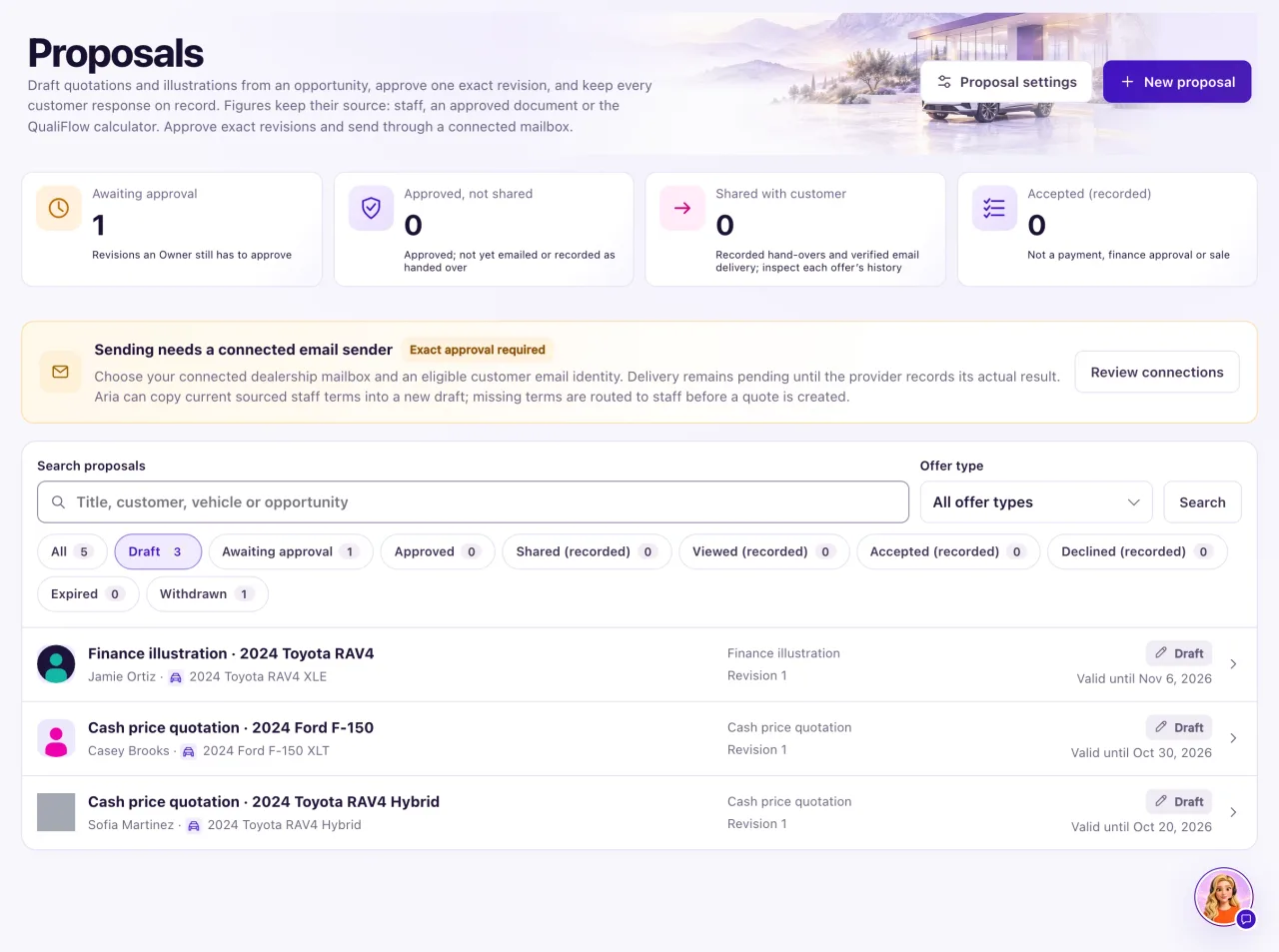
Owners create, edit, approve and send proposals. Staff with Proposals access can read every proposal in their locations; the page says "View only. Ask your Owner for access."
Before a proposal can be emailed, each of these must be in place:
- An open opportunity with a Contact.
- A vehicle in Inventory that is not archived, sold, unavailable, reserved or held by a sale.
- A selling price with its source, plus Assumptions and Terms. An illustration also needs a payment term.
- An Owner's approval of the exact revision.
- A connected dealership mailbox or verified email domain address.
- The customer's email address on their Contact, with recorded permission for follow-up on their inquiry.
- An offer that has not expired.
How to use it
- Select Proposals in the sidebar.
- Select a summary card to show only those proposals, or pick a status chip such as Awaiting approval.
- To find one, type a title, customer, vehicle or opportunity in Search proposals, choose an Offer type if you like, and select Search.
- Select a proposal to open it, or New proposal to start one (see "Create and approve a proposal").
- Owners: select Proposal settings to change the defaults, then Save settings.
What the data means
| Status | What it means |
|---|---|
| Draft | Being prepared |
| Awaiting approval | An Owner must approve the exact revision |
| Approved | Approved, not shared yet |
| Shared (recorded) | Emailed (provider confirmed) or handed over |
| Viewed (recorded) | Your team recorded that the customer viewed it |
| Accepted (recorded) | Recorded acceptance. Not a payment or a sale |
| Declined (recorded) | Your team recorded a decline |
| Withdrawn | Withdrawn by your team; kept on record |
| Expired | Validity ended at midnight after Valid until |
The four cards (Awaiting approval, Approved, not shared, Shared with customer, Accepted (recorded)) are workspace totals; search and offer type do not change them. Each row shows the revision, and "customer has N" when the customer holds an older one.
Proposal settings: Default expiry (days) (1 to 90, default 7), the Disclosure shown on every proposal and its email, Sales tax and trade-ins (whether a trade-in reduces the taxable price), and an optional Default sales tax rate (0 to 30%). A saved revision keeps the disclosure it was saved with.
Possible issues and fixes
The list says "Sending needs a connected email sender"
Symptom: A banner with Exact approval required and Review connections is always at the top.
Why: It is a reminder, not an error. Proposals are sent only from your dealership's own mailbox or domain.
Fix: Nothing, unless you want to email proposals and none is connected: then an Owner connects one in Settings → Connections.
How to check: On an approved proposal, Send from lists your address.
A proposal I made yesterday now says Expired
Symptom: The status chip shows Expired.
Why: The offer ended at midnight after its Valid until date, in its time zone. An expired offer can't be approved, shared or accepted.
Fix: Open it, go to Approval and select Renew as revision N, then approve it again.
How to check: The status is no longer Expired and Approve is available.
New proposal and the other buttons are missing
Symptom: You can open proposals but can't create or change them.
Why: Only Owners can change proposals. Staff with Proposals access can read them.
Fix: Ask an Owner.
How to check: The Owner sees New proposal.
My settings won't save
Symptom: Save settings shows "Enter a whole number of days.", "Enter the disclosure text." or a tax rate message.
Why: The expiry must be 1 to 90 whole days, the disclosure can't be empty, and the tax rate must be 0 to 30 with at most three decimals.
Fix: Correct the field named in the message and save again.
How to check: The settings save and new proposals use the new defaults.
