
What it is
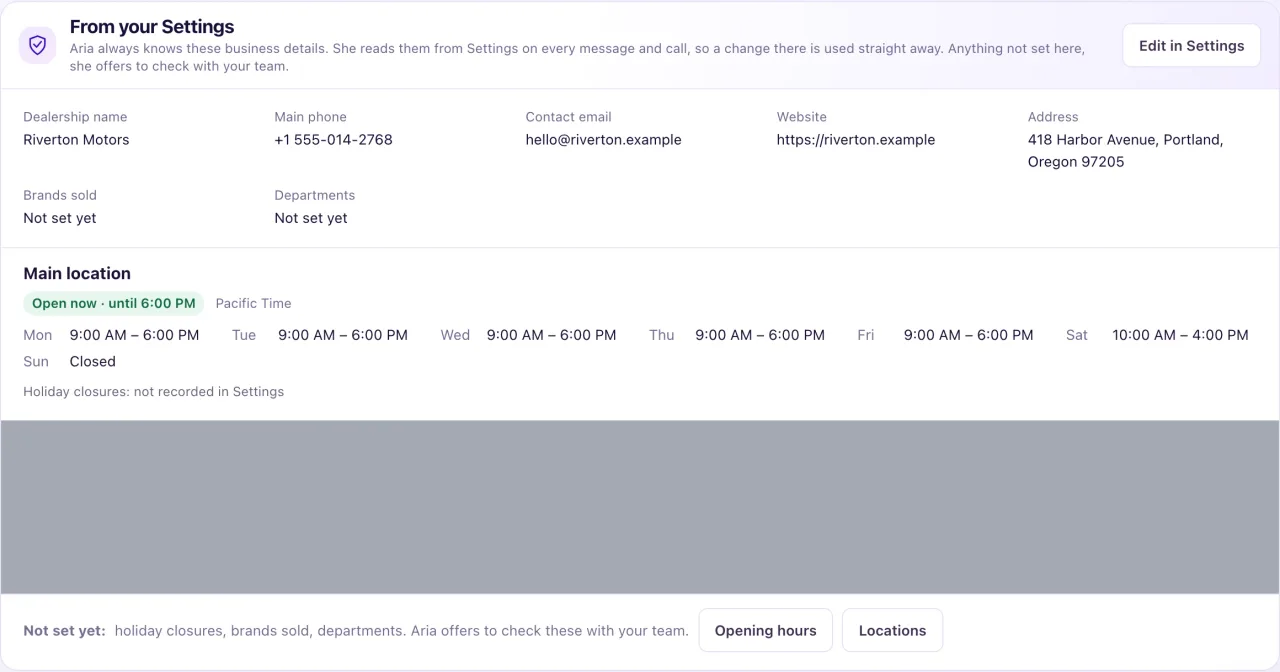
From your Settings is a read-only card on Aria Lab → Knowledge: "Aria always knows these business details." She reads them from Settings on every message and call, so a change there is used straight away. Anything not set, she offers to check with your team.
These details aren't Knowledge sources and never need publishing.
How to use it
- Open Aria Lab → Knowledge and find From your Settings.
- Check Dealership name, Main phone, Contact email, Website, Address, Brands sold and Departments.
- For each location, check whether it says it is open now, its time zone, weekly hours and holiday closures.
- Read the Not set yet: line for anything missing.
- Select Edit in Settings to change the business profile, or Opening hours and Locations to change hours and sites. A location's own address, phone, email and holidays are under Settings → Locations → Contact & holidays.
- Test it: in an agent's Chat test, ask "Are you open now?". The reply cites "From your Settings".
What the data means
"Open now" is worked out from each location's hours in its own time zone. "Open now: unknown (set the time zone and hours)" means Aria can't tell whether you are open.
In a conversation Aria uses the details of that conversation's location. A location without its own phone or email uses the business profile's.
Aria gives out the dealership's email address only when the customer asks how to email you. She never gives out a team member's own email or a QualiFlow address.
Brands sold and departments come from the dealership details you gave during onboarding.
Possible issues and fixes
Aria says she'll check with the team about our hours
Symptom: A customer asks if you are open, and Aria offers to check with the team.
Why: The location's opening hours or time zone are missing.
Fix: Set the hours in Settings → Opening hours and the time zone on the location or business profile.
How to check: From your Settings shows the location as open or closed now, not unknown.
Aria gives an old phone number or address
Symptom: Aria quotes a detail you have changed.
Why: The change was saved on a different location, or a Knowledge source repeats the old detail.
Fix: Check the conversation's location under Settings → Locations → Contact & holidays. Archive or update any Knowledge source with the old detail.
How to check: Ask again in a Chat test after a minute; the reply cites "From your Settings" with the new detail.
