
What it is
Aria books in QualiFlow's own calendar, so a connected Google or Outlook calendar is not needed. When she can't book, she never claims a booking: she passes the request to your team (the conversation shows Awaiting staff) or offers another time.
Setting Aria up to book for the first time? Start with Set up Aria to book appointments in Visits & appointments.
The most common cause is that no booking resources are set up. Aria then finds no free time to offer. Start with step 1: nothing else matters until it passes. An Owner does every fix below.
How to use it
- Hours: booking uses your opening hours (Settings → Opening hours) with the simple setup in Settings → Booking: each location and every active team member is bookable then. Check Other days you close there. A workspace with its own resources checks Settings → Booking → Advanced: at least one place (A place or bay; a place booked for Service for service visits) and one A person on staff linked to an active team member.
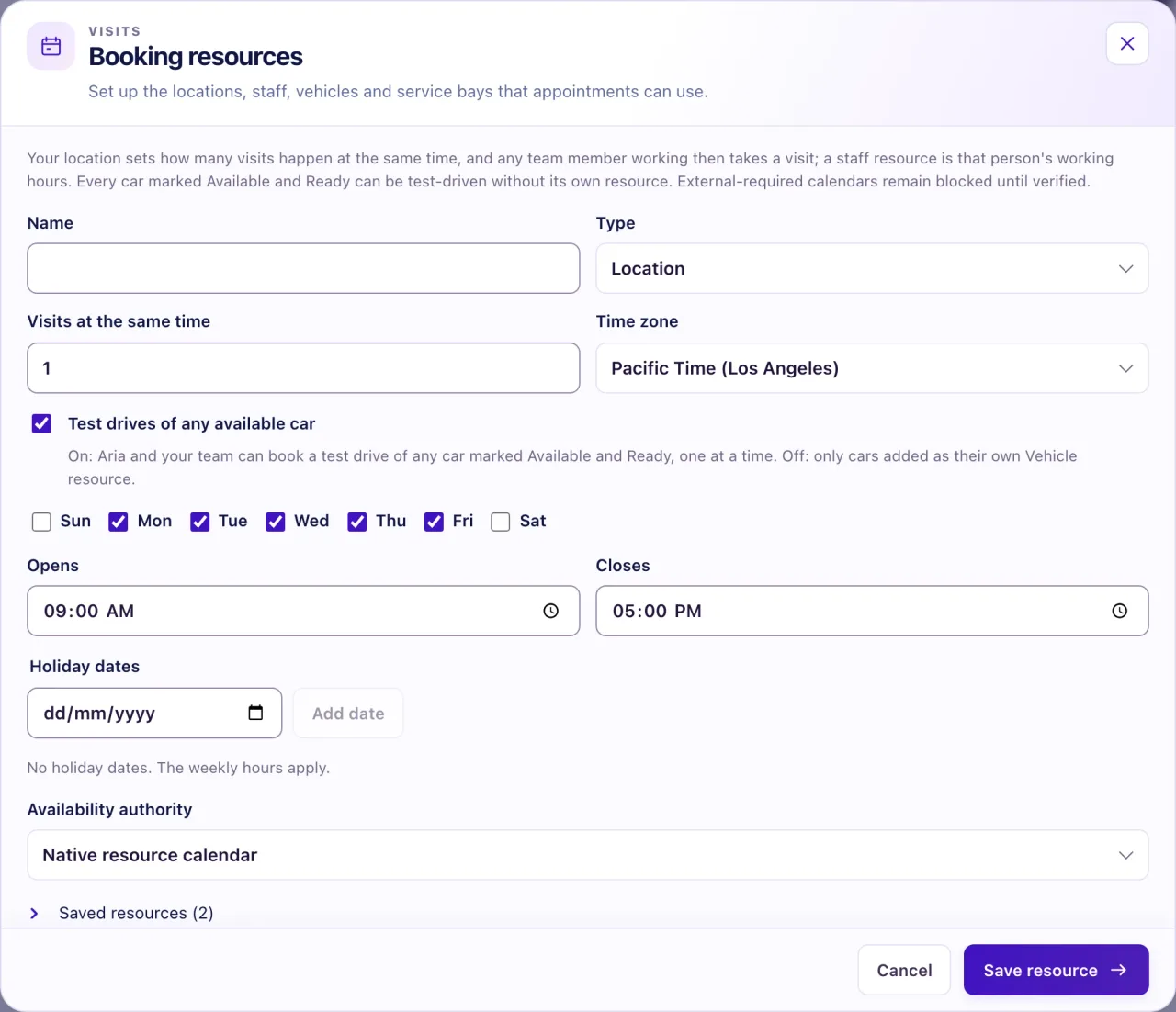
- Hours: Edit each resource and check its weekdays, Opens, Closes, Holiday dates and Time zone. Only the resource's own hours count, not your Settings opening hours. A Saturday booking fails if the resource has Monday to Friday only.
- Calendar: set Availability authority to Native resource calendar. A resource set to External calendar required · blocks until verified refuses bookings.
- Mode: the Aria: switch must be Ask first or Autopilot. On Off, only staff book.
- Rules: open Aria setup, step 3, and read What Aria may do. Book appointments must be under Aria will, approved by an active Owner.
- Checklist: in Settings → Go-live checklist, find Aria can book appointments. Turn on Book appointments turns on the rule and her booking tools; Create default resources adds only the missing staff or place.
- Contact: the conversation must be linked to a Contact that isn't in Trash or restricted. In Intake, select Link Contact & promote or Create Contact & promote.
- Exact time: the customer must say a day and time with a word such as "book", or answer "yes" to an exact time Aria offered. "Friday" alone gets an offer first. A reply that points at her offer ("the first one", "the afternoon one", "2") books that offered time. If it doesn't pick exactly one, nothing is booked and Aria asks which one, naming the times. She never books a time she didn't offer and the customer didn't name.
- No one in between: a "yes" counts only if Aria sent the last message. If a team member replied after her offer, ask the customer to say the day and time again.
- Control: the conversation must not be Taken over or Paused. Awaiting staff is fine.
- Free time: in Visits, select Book appointment, pick the same resources and select Find available times to see what is open in the next seven days.
- Ask Nora "why is Aria not booking appointments?". She checks the same facts and can prepare a missing rule or resource for you to confirm.
What the data means
Test drives: any car marked Available and Ready in Inventory can be test-driven, one test drive at a time. A car still Inbound, sold or held can't. If a location's Test drives of any available car is off, only cars added as their own Vehicle resource can be booked there.
Bookings at the same time: the location's Visits at the same time sets how many visits happen at once. Staff are pooled: any team member whose staff resource is working then takes the visit.
Ask first: a booking waits for an approver in Visits → Action review. Unapproved after 30 minutes, it expires and your team gets a task "Aria's booking request expired without approval". A booking is never approved by silence.
Possible issues and fixes
Aria says she can't book and passes customers to the team
Symptom: Aria tells the customer she passed the request to the team, the conversation shows Awaiting staff, and nothing is in Action review.
Why: Usually no booking resources exist, or they have no hours at that time. Next most likely, her approved rules don't allow Book appointments.
Fix: Work through steps 1 to 6. Create default resources in the Go-live checklist adds only the staff or place that is missing.
How to check: Aria can book appointments shows Ready, and Find available times lists open times.
Aria Lab says "Aria isn't allowed to book here yet"
Symptom: A test in Aria Lab or a real conversation shows that Aria isn't allowed to book.
Why: The agent's Book appointments tool is off, or for real customers the location's approved rules don't include it.
Fix: In Aria Lab, open the agent's Tools and turn on Book appointments, then start a new test. For real customers, an Owner approves Book appointments in Aria setup, step 3.
How to check: A new test books, and the Go-live checklist row shows Ready.
Aria books in Aria Lab but not with real customers
Symptom: Test bookings work, but real customers are passed to the team.
Why: Aria Lab reads your real resources but doesn't check live rules, the contact link or the conversation's state, and with no resources it uses simulated ones. A Lab booking proves only that Aria understands the request.
Fix: Add real resources and approve the rules. Then message a connected channel from your own account: "Book me a showroom visit tomorrow at 3pm", and answer "Yes" if she offers a time.
How to check: On Autopilot the visit shows as Confirmed in Visits; on Ask first it waits in Action review.
A customer is waiting for a booking
Symptom: Aria couldn't book and the customer is waiting.
Why: A handoff is open for your team.
Fix: In Visits, select Book appointment, choose the customer, resources and time, enter their words in Exact customer confirmation and select Prepare for review. Then Approve exact action and Confirm execution in Action review. In the Inbox, select Resolve handoff or Resolve and hand back to Aria.
How to check: The appointment is on the calendar and the handoff is resolved.
Aria didn't book during a phone call
Symptom: A caller asked for a visit but nothing was booked.
Why: Calls use the same checks. Aria never books on a call when your team took over or paused that customer's conversation; your team gets a task instead.
Fix: Hand the conversation back to Aria, or book it yourself and call the customer back.
How to check: The next caller's booking shows in Visits.
