
What it is
The Owner can move to another plan or billing period at any time in Settings → Billing.
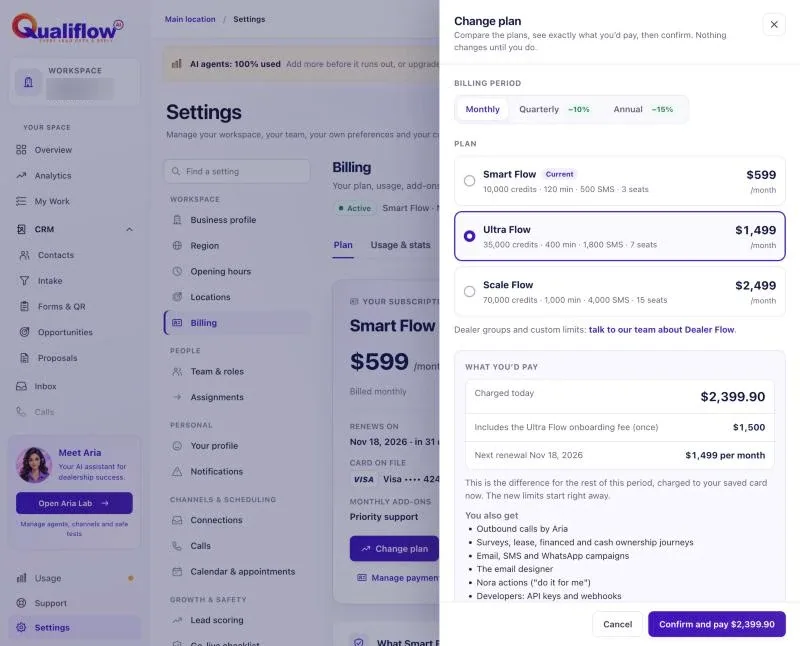
- Upgrade (a higher plan, or a longer period on the same plan): starts now. The difference for the rest of the current period is prorated and charged today to your default card. Your new allowances start now.
- Downgrade (a lower plan, or a shorter period): starts at the end of your current period. You keep everything on your current plan until then. Nothing is refunded or prorated.
How to use it
- Open Settings → Billing and select Change plan.
- Choose the plan and the period (monthly, quarterly or annual).
- Read what changes: the new price, whether it starts now or at the end of the period, and any onboarding fee.
- Confirm.
- To stay on your plan after scheduling a downgrade, choose your current plan again. The scheduled change is cancelled.
- You can also ask Nora, for example "Upgrade us to Ultra Flow". Her card shows the same preview, and nothing changes until you select Confirm.
What the data means
Onboarding fee on upgrade: moving to Ultra Flow or Scale Flow adds that plan's onboarding fee once, if you haven't paid an onboarding fee before.
A scheduled downgrade shows on the Billing page as "Your plan changes to Smart Flow on" and the date.
Before a downgrade, check what the lower plan doesn't include and its limits. If you use more seats, agents or contacts than it allows, you can't add more until you are under the limit.
Possible issues and fixes
The upgrade payment failed
Symptom: It says "The payment did not go through. Nothing was charged. Try another card."
Why: The bank declined the prorated charge. Your plan did not change.
Fix: Update your default card in Payment methods and try again.
How to check: Settings → Billing shows the new plan.
I want Dealer Flow
Symptom: Change plan has no Dealer Flow option with a price.
Why: Dealer Flow is a custom plan that QualiFlow prepares for your group, so it can't be picked here.
Fix: Contact sales — we prepare your plan. Create a ticket in Support with what you need. QualiFlow prepares your plan and arranges the switch from your current plan with you, so you are never billed twice.
How to check: Settings → Billing shows Dealer Flow and your limits.
I'm on Dealer Flow and can't change my plan
Symptom: Settings → Billing shows "Managed by QualiFlow — contact us to change it" instead of Change plan.
Why: Changes to a Dealer Flow plan go through QualiFlow.
Fix: Create a ticket in Support with the limits, features or price you want. QualiFlow prepares the new version and applies it to your plan.
How to check: Settings → Billing shows the new limits.
