
What it is
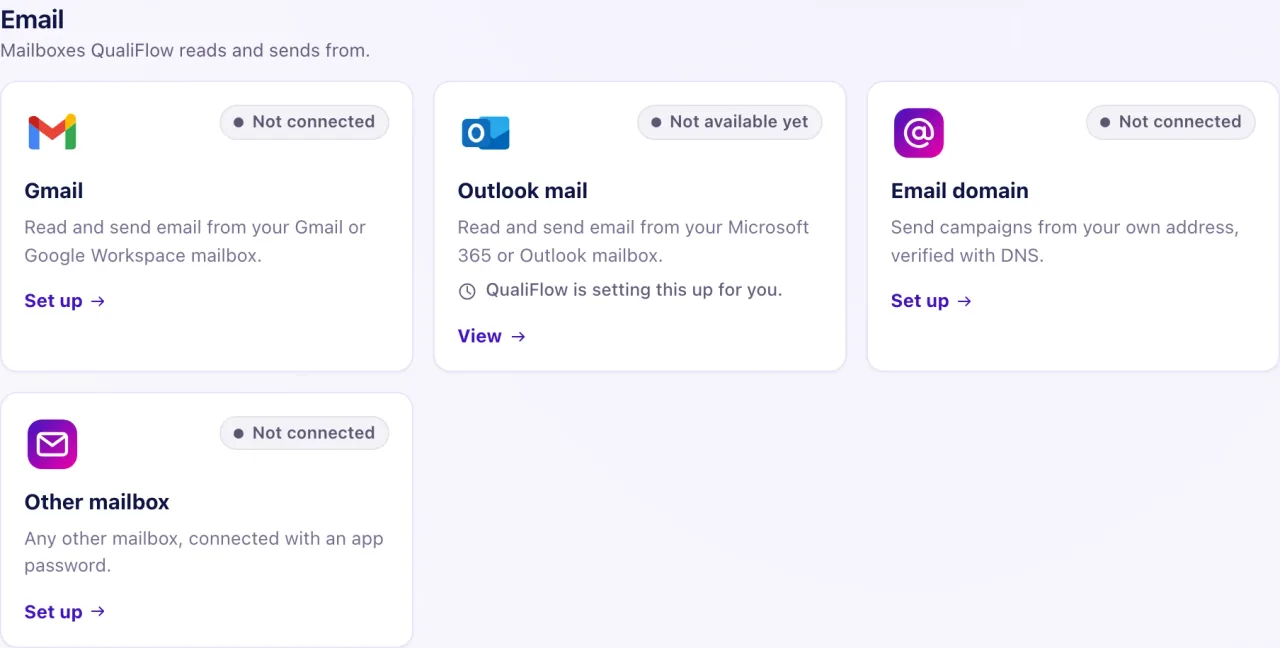
QualiFlow sends customer email only from your dealership's own address: a connected Gmail or Outlook (Microsoft 365) mailbox, or a sender on your own verified email domain. It never sends customer email from a QualiFlow address. Without one, customers don't receive email; texts and other channels still work.
When an email doesn't go out, the reply box, the sender picker or the campaign's schedule says why.
How to use it
- Read the message where the email was stopped: the reply box in the Inbox, the From sender in a campaign, or the recipient's line on the campaign's schedule.
- If it says Connect your dealership's email, an Owner opens Settings → Connections and connects Gmail or Outlook, or your own email domain.
- If a domain sender shows Not ready, open the email domain, fix the DNS records at your domain provider and select Verify DNS.
- If the customer's address is under Stopped addresses, read why it was stopped before you lift it.
- If an email campaign is scheduled but nothing went out, check whether its schedule is Held.
- After the fix, send the email again. An email that was stopped isn't sent later by itself.
What the data means
| What you see | What it means |
|---|---|
| Bounced: no email is sent | The address bounced for certain. QualiFlow sends it no email at all |
| Marked as spam | The customer reported spam. Marketing email stops; replies and appointment messages still go |
| Held | The campaign schedule waits for an Owner to bind an approved delivery policy |
| Not sent, no captured permission | The recipient has no recorded marketing permission for that exact address |
| Too late to send, needs review | The email could no longer go out on time. It is never sent late |
Only email campaigns can be approved and sent. Text and WhatsApp campaigns can be drafted, but they don't send.
Possible issues and fixes
The reply box says "Connect your dealership's email"
Symptom: You can't send an email reply. The line above the reply box says Can't reply, and the chip under the customer's name reads Can't reply · email not connected. Select Why? or the chip for the Connect your dealership's email card.
Why: No Gmail or Outlook mailbox is connected and no verified domain sender exists.
Fix: An Owner opens Settings → Connections and connects Gmail or Outlook (Microsoft 365), or adds your own email domain. Signing in to QualiFlow with Google doesn't connect a mailbox.
How to check: The Can't reply line and chip are gone, and a test reply shows as sent.
The sender says "Waiting for the domain's DNS to verify"
Symptom: A domain sender shows Not ready with "Waiting for the domain's DNS to verify".
Why: The DNS records for your email domain aren't in place or haven't been checked yet.
Fix: Add the DNS records shown on the email domain page at your domain provider, then select Verify DNS. DNS changes can take a while to show.
How to check: The sender shows Ready.
A campaign says "Choose a Marketing or Marketing and service sender for campaigns"
Symptom: The campaign won't accept your sender: "This address is set up for service email only."
Why: Campaigns need a sender set up for marketing email. A Service-only sender can't send them.
Fix: Choose a sender whose use is Marketing or Marketing and service, or add one on the email domain page.
How to check: The sender shows Ready in the campaign.
The address is under Stopped addresses
Symptom: Email to one customer never goes out, and their address is listed under Stopped addresses.
Why: A verified bounce stops all email to the address. A spam report stops marketing email only.
Fix: An Owner selects Lift only if the address is right and the customer wants email. If it bounces again, it is stopped again. A stop recorded for your domain can't be lifted here: contact support.
How to check: The address is no longer listed.
An email campaign is scheduled but nothing was sent
Symptom: The campaign's schedule says Held and no recipient got the email.
Why: A scheduled email campaign starts Held. Nothing goes out until an Owner binds an approved delivery policy.
Fix: An Owner at the schedule's location chooses a Delivery policy and selects Bind delivery policy.
How to check: Recipients move from Held to sent on the schedule.
Send test stays off in the email designer
Symptom: Send test is greyed out, with "Send test stays off until every step is ready."
Why: The campaign has no ready sender, your sign-in email isn't verified, or 5 tests of this email were sent in the last hour.
Fix: Choose a ready Gmail or Outlook mailbox or a Marketing or Marketing and service domain sender, verify your sign-in email, or wait an hour.
How to check: Send test is available and the test arrives in your own inbox.
