
What it is
After you start or schedule an Aria Campaign, its Monitor step shows the Campaign status, every recipient's progress, outcomes to confirm and the results. Every contact is checked again just before each message or call: opt-outs, takeovers, timing and sender readiness.
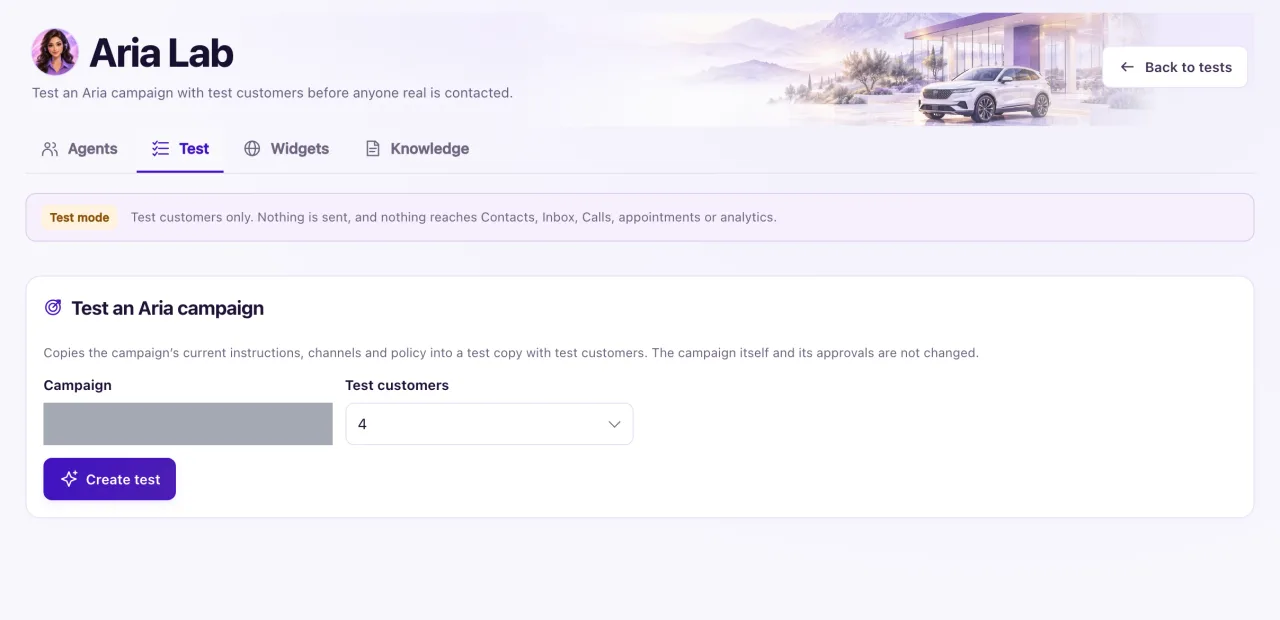
Before going live, try the campaign in Aria Lab with test customers. "Test customers only. Nothing is sent, and nothing reaches Contacts, Inbox, Calls, appointments or analytics."
How to use it
- To test first, select Test in Aria Lab on the Review step, or open Aria Lab → Test → Test an Aria campaign.
- Choose the Campaign and the number of Test customers (2 to 10), then Create test. The test copy is never approved, scheduled or sent, and your campaign is not changed.
- Optionally choose a later time and select Advance time to see quiet hours and follow-ups. Reply as a test customer to see how Aria answers.
- On a live campaign, open the Monitor step.
- Use Pause to stop unsent messages and calls; conversations already started continue. Resume checks everyone again and never repeats a completed action.
- After fixing a held cause, select Release held, choose the reason, and those actions are checked again and sent if still eligible.
- Under Outcomes to confirm, select Confirm outcome and choose It was sent or It was not sent, saying how you know.
- Under Recipients, filter by status, select Approve message when each message needs approval, or Exclude someone to cancel their unsent actions.
- Close remaining closes everything not yet sent. Cancel campaign stops all unsent work for good; a customer still waiting for an answer is handed to a person.
What the data means
Action statuses include Queued, Queued for delivery, Waiting for setup, Needs review, Submitted, Delivered, Failed, Uncertain, not resent, Suppressed and Cancelled. Uncertain, not resent means the provider's answer was lost; it is never resent automatically.
Results count Selected, Eligible and Excluded people, first actions and follow-ups, submitted and delivered messages, replies, hand-offs and opt-outs. Results are provisional, and opportunities, bookings and sales are marked "associated, not causal": a campaign is never credited with a deal.
Possible issues and fixes
Messages say Held or Waiting for setup
Symptom: A recipient's line says "Held: the sender is not ready." or another held reason.
Why: A check failed when the action was due. WhatsApp, Instagram and Facebook Messenger can't send in a live campaign today, and Aria calls aren't connected for live campaigns.
Fix: Connect or repair the sender in Settings → Connections, or choose another channel. Then select Release held.
How to check: The action moves to Submitted or Delivered.
Messages are Queued, waiting for approval
Symptom: Recipients stay Queued waiting for approval.
Why: The campaign policy has Approve each message before it is sent switched on.
Fix: Select Approve message on each recipient in Recipients.
How to check: The action moves on to Queued for delivery.
The campaign is paused, but Aria is still talking
Symptom: The status is Paused (replies continue) and customers still get answers.
Why: Pausing stops new messages and calls only. Conversations already started continue under the approved goal.
Fix: To end them, select Cancel campaign. Customers still waiting are handed to a person.
How to check: The status shows Cancelled.
Nobody got a message at night
Symptom: Actions wait with "Deferred: outside allowed hours."
Why: Messages go only inside the policy's allowed hours in each contact's time zone.
Fix: Nothing to fix. They go out when the allowed hours start.
How to check: The actions move to Submitted in the morning.
